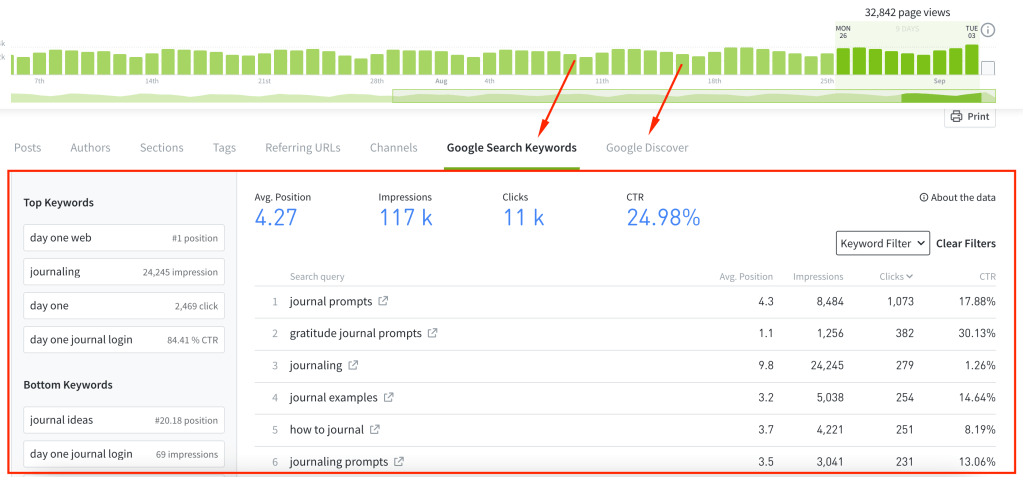
We have enabled export and save views on the Google Search Console (GSC) tabs. Since there’s a limitation in GSC to return up to 5,000 keywords, exports are also limited to 5,000 entries.
New: Google News now available on the Referrers tab
In addition to seeing the keywords that are driving traffic to your site and which stories are showing in Google Discover, you can now also see your stories that are getting featured in Google News and boosting your content performance.
Improvements & Bug Fixes:
Fixed GSC user permissions in the post listing and overview date label
Fixed visual bug where Referrer Listings did not properly show conversion numbers
Understand your Google Keywords and Discover performance right in Parse.ly
You can now integrate your Google Search Console account with Parse.ly, and start sending keyword data and Google Discover data directly into your Parse.ly Dashboard, eliminating the need to log in separately to Search Console. This saves time, reduces tool switching, and enhances your focus on keyword and Google Discover analysis to improve content performance.
Create a Top Performers report for the Sites in your network
You can now run and schedule Top Performers reports focused on ranking the top Sites in your network. Select the new Sites aspect and you can further customize the report with all the available metrics and filters offered in Parse.ly. The resulting report will show you data ranked by the Sites performing best on those metrics for the time period selected.
The highlighted “Sites” label is now available when creating Top Performers reports.
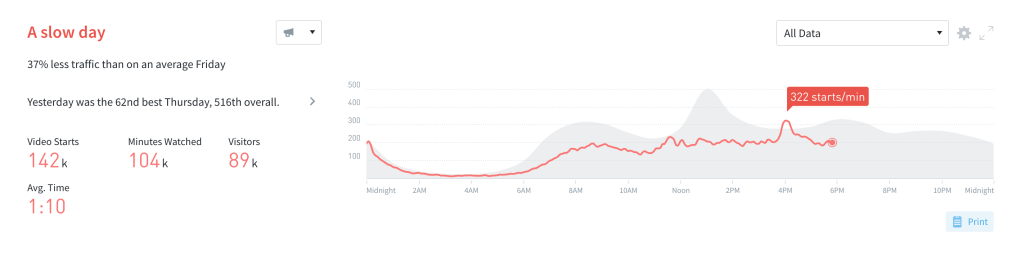
Video metrics are now available on the Overview page
In addition to easily tracking page views or conversions at a glance, you can now easily see how your videos are performing.
To enable this view, go to Overview settings (the cogwheel in the top right corner), click “Summary & Timeline”, and then choose your “Timeline Metric”.
We will be switching to a new CDN system, and as part of this upgrade, we will no longer support TLS v1.0 and v1.1 protocols. This change will be effective immediately. Our analysis indicates that this change will impact approximately 0.0008% of our traffic.