Cookies
Parse.ly uses first-party cookies to power a number of features. This guide will describe our cookies, how long cookies last, their benefits, and alternative implementations.
Description
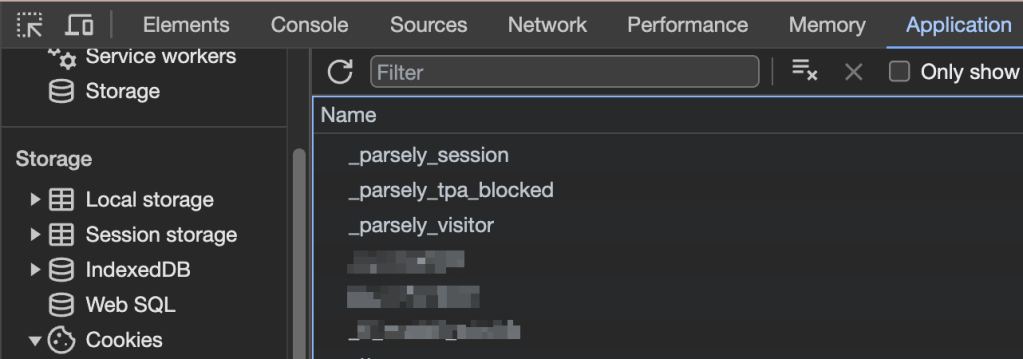
The following table lists every assignment to document.cookie that our JS SDK can make. We will not always write or read these cookies on every Parsely-tracked pageload.
All of these cookies are set on the domain of the integrating page, so they are considered first-party cookies. The tracking logic used by the SDK does not set any third-party cookies.
Depending on browser compatibility and user-settable configurations, all of these pieces of data may be stored either in document.cookie or in window.localStorage. You may read more about localStorage here. Regardless of the storage medium, they are functionally identical.
| Cookie | Purpose | Time To Live (TTL) |
|---|---|---|
test | used to discover cookie support, value undefined | none |
_parsely_visitor | JSON document uniquely identifying a browser and counting its sessions | 13 months |
_parsely_tpa_blocked | JSON document storing a flag indicating whether pixel.parsely.com is not accessible by the tracker | 12 hours |
_parsely_slot_click | explicitly cleared on some tracker loads, JSON document storing positional information about a clicked internal link | none |
_parsely_session | JSON document storing information identifying a browsing session according to Parsely’s proprietary definition | 30 minutes |
vipexp-local-state | Used for Headline Testing. Indicates which test headline variant is shown to user. localStorage only | none |
Benefits
Several of our features benefit from these cookies. That includes distinguishing between new and returning visitors, informing the API Recommendations endpoints, Overlay slots, and providing a chain of content attribution for your conversions.
Likewise, you can benefit from setting your own cookies to enable audience segmentation.
Alternatives
Parse.ly can track metrics from your primary domain and its subdomains without additional configuration. But if you may configure our tracker so that each subdomain has its own first-party cookie pool. To set that up, follow these instructions.
If you want to use LocalStorage instead of Cookies, then we have guidance for that as well here.
More Cookie Information
You might need to delete cookies for troubleshooting purposes. To do so, follow these instructions.
If you’re reading about Cookies, then you may be interested in Parse.ly’s Privacy Policy and the cookie policy of Automattic, our parent company.
Please contact Support if you have any questions about Parse.ly Cookies.
What happens if a visitor blocks cookies?
This depends on whether you load our tracking code conditionally (Scenario 1) or unconditionally (Scenario 2).
Scenario 1: the tracking code does not load
If the tracking code does not load, the cookie will not load and we will not track the visitor.
It’s possible to conditionally load the tracking code with a consent management solution, for example by following One Trust’s documentation: Cookie Consent Integration with Google Tag Manager.
If you want to see if our tracking code is loading on your site, review our testing documentation.
Scenario 2: the tracking code loads
Suppose your site does not have a consent management solution and you load the tracking code unconditionally.
It’s still possible for your website visitors to reject cookies with their browser settings. In this case, a page view will fire but the u value, i.e., the pseudonymous unique user ID will equal OPTOUT. This would mean that multiple rejecting-cookie visitors will be treated as the same visitor.
If you want to see if page views are firing on your site, review our testing documentation.
Pro Tip
We’ve found that the most privacy-conscious way to implement Parse.ly is to only load the tracker after consent has been obtained. Even loading the tracker and disabling auto-tracking results in DNS and CDN calls which could have logs associated with them. To be absolutely certain no information has been improperly disclosed, it’s best to not insert the tracker onto the page until after consent has been obtained.
Last updated: August 14, 2026