Journeys
Overview
Parse.ly Journeys combines acquisition, content, and conversion data in a single view, enabling you to understand the journey from first click to outcome.
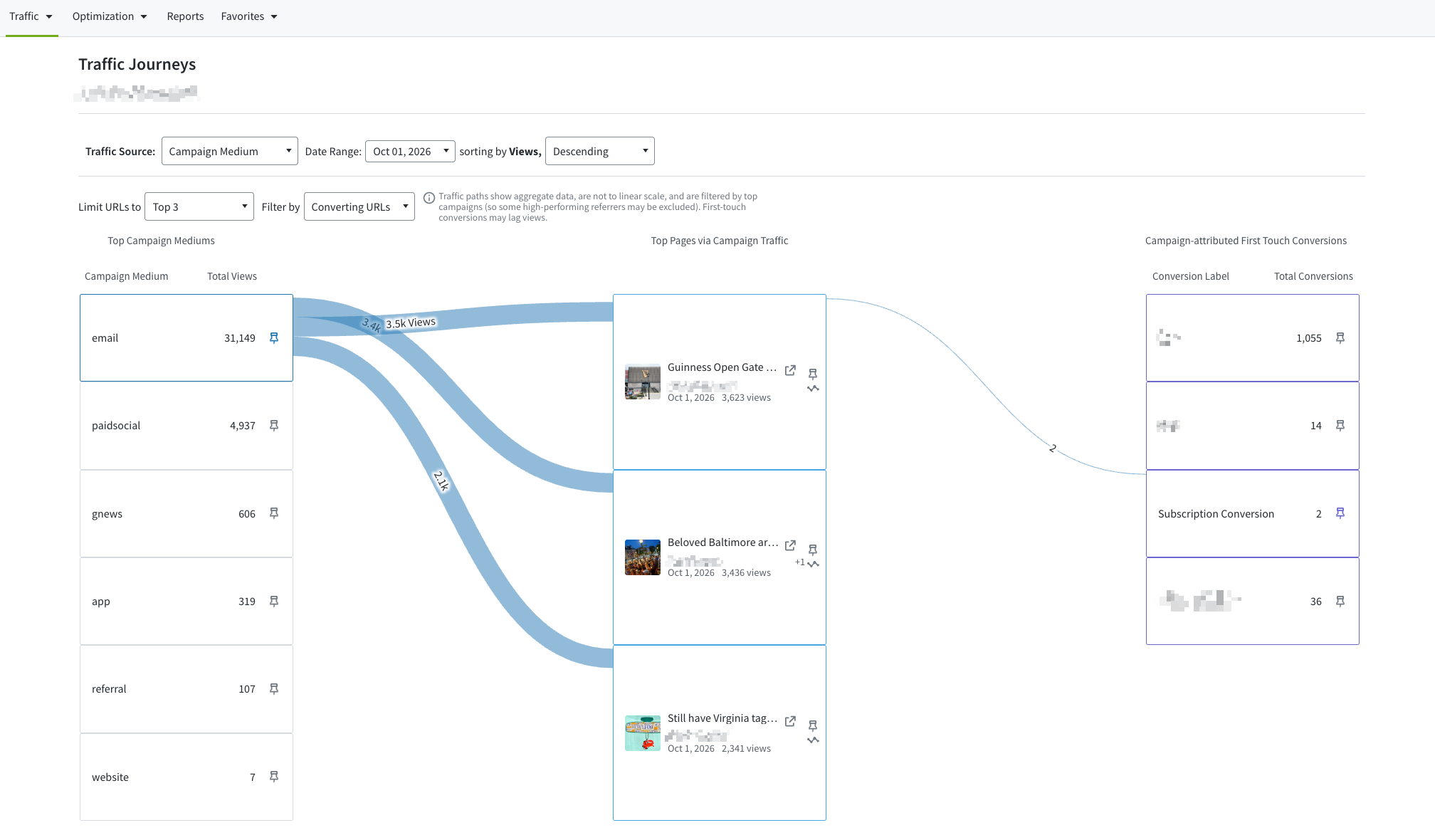
By visualizing audience pathways in an interactive Sankey diagram, Journeys helps teams uncover high-performing entry points, compare traffic sources, and invest in the content and channels that truly drive conversions.
- For media: See which articles bring in readers, how they’re discovered, and which ones drive subscriptions. Journeys highlights the stories that build loyalty and the channels that deliver your most engaged readers.
- For enterprise: Connect campaigns, content, and on-site behavior to measurable conversions. Journeys reveals which assets influence outcomes, helping you refine acquisition and content strategies with confidence.
Note
Journeys works best when Conversions tracking and Google Search Console (GSC) are enabled for your account. Only users with access to Campaigns, GSC, and Conversions data will be able to view the full reader pathways.
Why use Journeys
Journeys makes it easier to understand and optimize the performance of your acquisition and content strategies. With it, you can:
- Identify top-performing campaigns and keywords — See which ones generate the most conversions.
- Understand content entry points — Discover which articles best capture new visitors.
- Compare channels — Find out whether campaigns or organic search drive more valuable traffic.
- Optimize strategy — Focus on high-performing conversion types and improve the efficiency of your conversion pipeline.
Key features
- View reader journeys covering up to the last 91 days.
- Adjust the number of top posts (first content) displayed — from 3 up to 40.
- Switch between top-performing and least-performing entry sources.
- Explore aggregated paths in an interactive Sankey diagram.
- Use pinning to highlight specific pathways for a given entry source, first content, or conversion event.
- Choose among different campaign parameters, including Campaign Groups.
- Filter between converting URLs, non-converting URLs, or all URLs.
How to use Journeys
- In your Parse.ly dashboard, open the Optimization menu and select Journeys.
- If your account includes Google Search Console data, switch between traffic sources (e.g., Campaigns or GSC) using the Traffic Source toggle. Google Search Console data will not appear if the data is not available for the date selected.
- Use filters to narrow down your view:
- Show top-performing first content.
- Explore specific pathways for converting or non-converting content.
- Sort the Sankey diagram by number of views to entry sources.
- Expand the date range to include more data.
- Use the pinning feature to highlight important pathways — for example, a specific campaign, article, or conversion type. Pinning highlights the union relationship only between aspects.
Requirements
| Component | Required for full experience | Description |
| Campaigns | ✅ | Needed to view acquisition sources such as campaign UTM data. |
| GSC (Google Search Console) | ✅ | Enables organic keyword and search source tracking. |
| Conversions | ✅ | Connects reader journeys to measurable business outcomes. |
Access
Journeys is enabled for all Parse.ly accounts but can only be accessed by users with permission to view the relevant Parse.ly features. Admins can manage user access and permissions by following the steps in our guide: Edit user access.
Best practices
- Enable Conversions tracking to visualize the complete reader flow from acquisition to conversion.
- Connect Google Search Console to include organic search data in your pathways.
- Compare multiple date ranges to understand how reader journeys change over time.
- Pin key campaigns or articles to monitor their downstream impact.
Last updated: October 14, 2026