Headline Testing access and permissions
By default, only admins can completely manage headline tests — non-admins cannot create/start or end tests. Non-admin users can be given permissions to fully manage or view headline tests.
| Admins | Non-admin users | Users with manage permissions | Users with view permissions | |
|---|---|---|---|---|
| Can see the Headline Testing tab | ✅ | ❌ | ✅ | ✅ |
| Can see single headline tests | ✅ | ❌ | ✅ | ✅ |
| Can create new headline tests | ✅ | ❌ | ✅ | ❌ |
| Can end headline tests | ✅ | ❌ | ✅ | ❌ |
| Can rerun headline tests | ✅ | ❌ | ✅ | ❌ |
Adjust Headline Testing permissions for users
- Admins can go to the User Management page:
https://dash.parsely.com/<site-id>/settings/users- Admins can also click the account menu in the top bar, then select the “Users” option there.
- On the User Management page, select a user using the checkbox in the left-most column.
- Click the
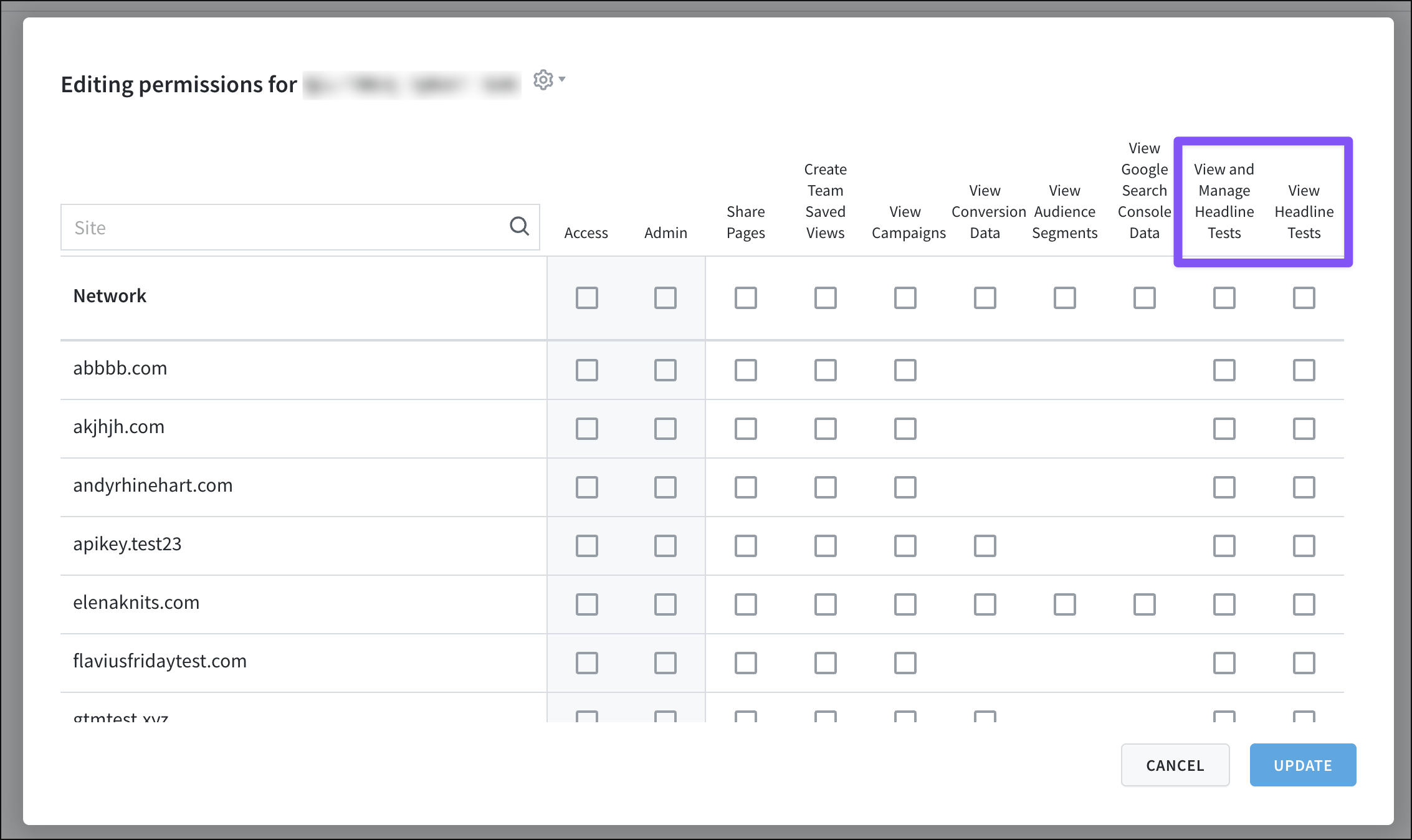
Edit Permissionsbutton that appears. - In the pop-up that opens, check/uncheck the
View and Manage Headline TestsorView Headline Testspermission for that user for any listed site. - Click “Update” to save the adjusted permissions.
Last updated: November 06, 2025