Introducing the Parse.ly MCP server: your analytics, in your AI assistant
Your Parse.ly data now works wherever your AI assistant does. The Parse.ly MCP server connects Claude, ChatGPT, and other MCP-compatible assistants directly to your analytics, so you can ask questions in plain language and get answers rooted in your real audience data without leaving your workflow.
What you can do with it
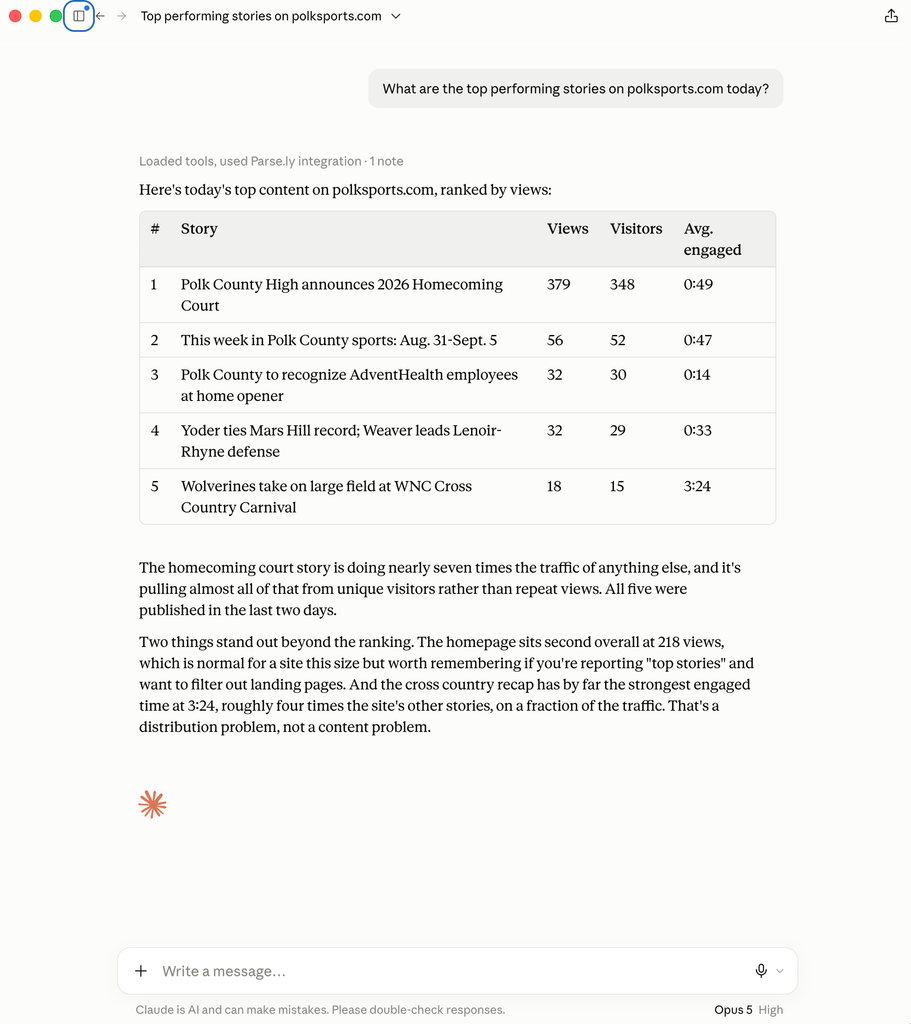
Ask your assistant the questions you would normally take to the dashboard: “What drove yesterday’s traffic spike?”, “Which stories should we promote this morning?”, or “Summarize this month’s performance for my team.” The assistant chains Parse.ly tools together to explain what happened and why, for example pulling a traffic trend, then its referrers, then the top content behind it, all in one conversation.
More than 20 tools are available, covering top content, traffic trends, referrers, real-time activity, post detail, top authors, sections, and tags, conversions, goals, campaigns, headline tests, network rankings, Apple News discovery, and documentation search.
No new credentials, no new risk
You authorize with the Parse.ly login you already have, using OAuth. There are no API keys to copy or store, and access is scoped to exactly the sites and permissions your dashboard account already has.
Getting started
Parse.ly is an official Claude connector, so Claude users can connect in a few clicks from Claude’s connector directory. Any other MCP-compatible assistant, including ChatGPT, Claude Code, and Codex CLI, can connect to https://dash.parsely.com/mcp. The MCP server documentation has step-by-step setup instructions for each client.
Questions? Reach out to your account team or to our support team.
Last updated: September 01, 2026