Configure Headline Testing in the Parse.ly WordPress Plugin
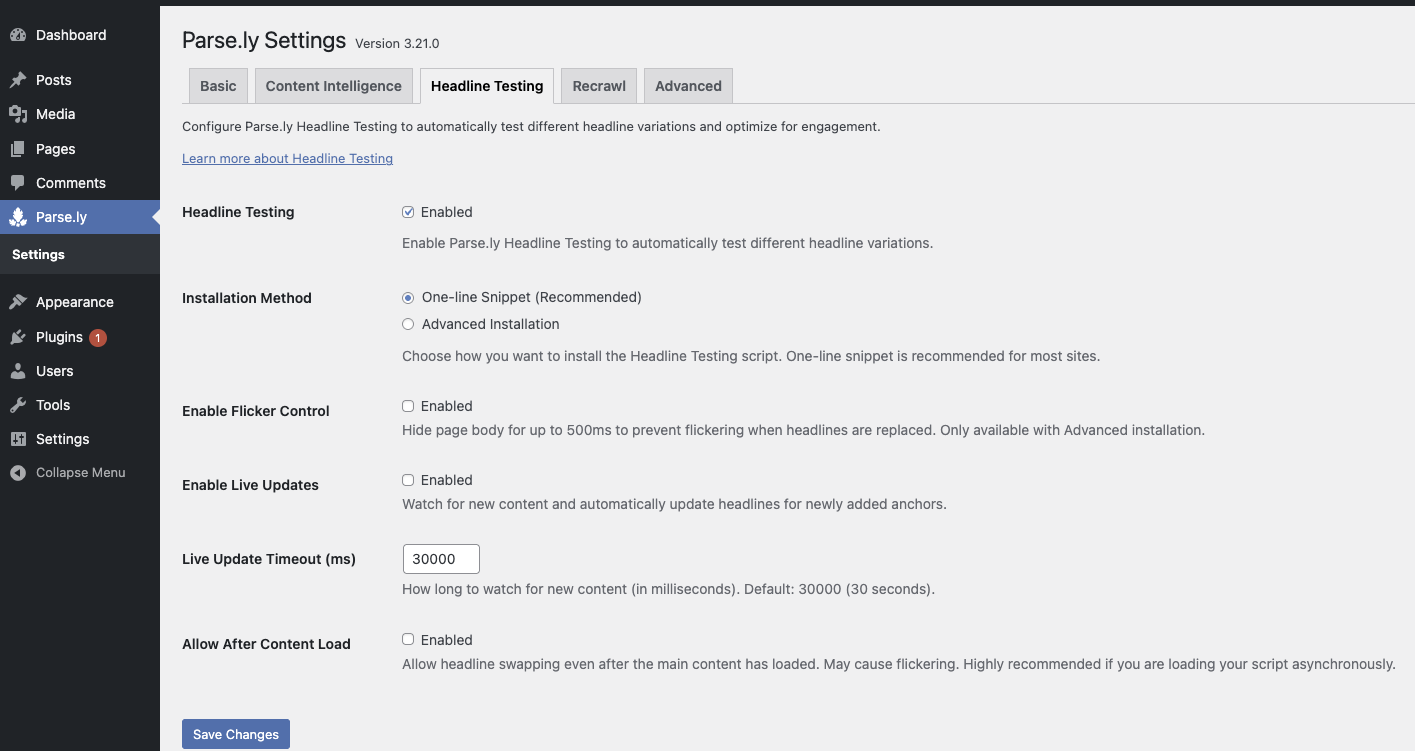
The Parse.ly WordPress Plugin lets you enable and configure Parse.ly Headline Testing directly from your WordPress Admin area.
This integration makes it easy to test multiple headline variations and optimize engagement without manually adding scripts or editing templates.
Note
Headline Testing settings are available only to WordPress administrators (users with the manage_options capability).
Accessing the Headline Testing settings
- In your WordPress Admin sidebar, go to Parse.ly → Settings.
- Select the Headline Testing tab.
- Configure your preferred options (see below).
- Click Save Changes to apply your settings.
Once enabled, the plugin automatically adds the Parse.ly Headline Testing script to your site’s pages.
Default behavior: Headline Testing is enabled by default on new plugin installations. You can disable or reconfigure it at any time.
Available options
Headline Testing
Enable or disable Parse.ly Headline Testing for your site.
Installation Method
Choose how the headline testing script is installed:
- One-line Snippet (Recommended): Automatically includes the standard Parse.ly Headline Testing script (https://experiments.parsely.com/vip-experiments.js). Ideal for most sites.
- Advanced Installation: Inserts the headline testing logic inline for more granular control. Recommended for developers with custom integrations.
Enable Flicker Control
Reduces visible flicker when headlines are replaced by briefly hiding the page body (up to 500 ms).
Note: Only available with Advanced Installation.
Enable Live Updates
Automatically refreshes headline variations when new content loads—for example, on pages with infinite scrolling.
Live Update Timeout (ms)
Sets how long Parse.ly should watch for new content (in milliseconds).
Default: 30000 (30 seconds).
Allow After Content Load
Allows headline swapping even after the main content has fully loaded.
Caution
Enabling the Allow After Content Load option may cause visible flickering if the page continues to update headlines after load.
Best practices
- Use One-line Snippet unless your site uses custom caching or rendering logic.
- For dynamic or single-page applications, enable Live Updates and adjust the Live Update Timeout.
- Avoid enabling both Allow After Content Load and Flicker Control unless necessary for your site setup.
- After saving changes, view your homepage’s source code and confirm that the headline testing script appears as expected.
Troubleshooting
If headline testing doesn’t appear to work as expected:
No script found:
Check that Headline Testing is enabled and that the One-line Snippet installation method is selected.
The script should appear as https://experiments.parsely.com/vip-experiments.js in your page source.
Clear your site and CDN caches, then reload the page.
Flickering issues:
Enable Flicker Control (if using Advanced Installation) to reduce visible flashes when swapping headlines.
Headlines not updating on scroll or dynamic load:
Confirm that Enable Live Updates is active and the Live Update Timeout is sufficient for your content loading pattern.
Still not working?
Open your browser console and check for errors related to vip-experiments.js.
If the problem persists, contact Parse.ly Support for assistance.
Version note
The Headline Testing tab and related configuration options are available starting with Parse.ly WordPress Plugin version 3.21.0.
Last updated: February 11, 2026