Product update: November 14, 2018
Path Fragments
Users now have the ability to use URL path fragments as a filter when viewing post or non-post data.
A path fragment refers to the parts of a URL separated by slashes. For example, in the URL https://tea-fanatics.com/flavors/black-tea/earl-grey/, the path fragments are “flavors” “black-tea” and “earl-grey”.
Two notes about fragments: 1) Data is only available since Oct. 1; 2) Your site must have a URL structure where paths are present in order for data to be available.
Path fragments are displayed like this:

When making a selection, the list of fragments will immediately narrow to show only the lower-level fragments that appear with the selected fragment.

The height of each row shows the popularity of the fragment compared to other fragments. That is, the taller the path fragment’s box, the more page views it received (or referrer views when on a referrer detail page) relative to the other path fragments.
Once you have selected a path fragment, you can click on the “View Details” option to see full information about URLs matching the pattern.
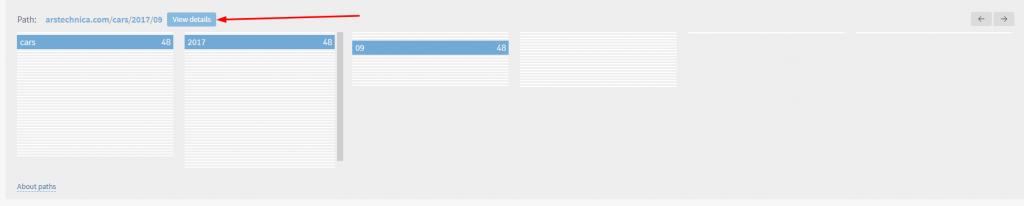
You can drill down as many levels as need be – additional levels can be added to the screen using the arrows in the upper right corner of the Paths box.
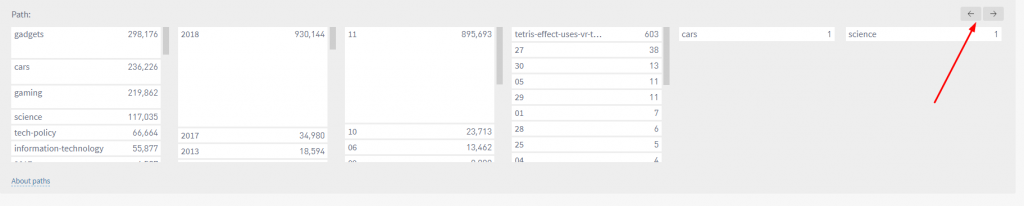
Paths are available as a filter in all sections of the dashboard as well as in the reporting suite.
Last updated: September 17, 2025